What is it
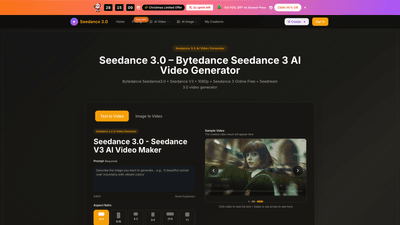
Seedance 3.0 AI Video Generator is a professional, browser-based solution powered by the Seedance 3.0 model from Bytedance. It enables you to create high-quality 1080p videos directly from text prompts or uploaded images, with no installation required. The platform supports both text-to-video and image-to-video workflows, delivering cinematic, pro-ready output that’s ideal for marketing, social media, product showcases, and storytelling. Seedance 3.0 emphasizes consistency—maintaining characters and style across multiple scenes—so you get cohesive narratives without drift between shots. Outputs are MP4, with options for various aspect ratios and durations, and most plans include a commercial use license and no watermark, making it suitable for both personal projects and business use.
Key differentiators include multi-modal creation (text and image prompts), 1080p native video quality, rapid generation with a high success rate, and flexible credits-based pricing. The tool is designed to accelerate creative workflows: draft-to-publish iterations, quick variations, and interchangeable elements that let creators experiment without sacrificing quality. Whether you’re crafting a social post, a marketing video, or a narrative presentation, Seedance 3.0 brings cinema-grade motion and synchronized audio-visual storytelling to your fingertips.
Features
- Seedance 3.0 AI Video Generator (Bytedance Seedance 3.0) powering text-to-video and image-to-video workflows
- Native 1080p HD output with cinematic motion and smooth, physics-aware movement
- Consistent characters and style across scenes to support multi-shot storytelling
- Multi-modal creation: generate from prompts or upload an image to guide style, mood, and actions
- Accurate prompt-driven scene layout and actions for on-target results
- Audio and visuals stay in sync for immersive, pro-ready videos
- Reference matching: align style, motion, and mood to your supplied images or clips
- Targeted edits with rest of the clip unchanged (you control what changes)
- From draft to publish: fast iteration, variations, and export-ready 1080p clips
- Download formats: MP4, ideal for marketing, social media, and professional use
- No watermark on supported plans (yearly billing) and commercial use license included on eligible tiers
- Flexible plan options with credits-based pricing and priority support
- Extensive model ecosystem: Seedance3.0 Model, Seedream 3.0, and related tools (Veo 3, Sora 2, Wan 2.5)
- Accessibility: works in your browser across devices; no app install required
- Free credits and sign-in perks to jump-start projects
How to Use
- Access Seedance 3.0: Open Seedance 3.0 in your browser via the Bytedance Seedance 3.0 official website, Seedance3.0 App, or dreamina web. Sign in to receive free credits to start.
- Choose your workflow: Select Seedance 3.0 AI Video Generator for text-to-video or image-to-video creation.
- Create and download: Enter Seedance 3.0 prompts or upload an image, pick an aspect ratio and video length (e.g., 5–10 seconds, 720p or 1080p), then generate. Review the result and download your 1080p video—ready for publishing with minimal or no editing.
Pricing is presented as clear tiers with annual options that offer meaningful savings, including a limited-time Christmas offer. The current promotion highlights 32 remaining spots and 50% off on annual plans, making it especially compelling for teams and creators ready to scale.
- Free credits are available upon sign-in, enabling you to test Seedance 3.0 Online Free before committing to a plan.
- Outputs are delivered as MP4 files, suitable for social media, marketing campaigns, pitches, and client deliverables.
Annual plans emphasize long-term value, with higher credit allocations and more monthly video outputs, plus additional benefits like priority generation queue and commercial use licenses. The platform also emphasizes “no watermark” outputs on many annual plans, helping maintain a professional brand appearance.
Pricing
Seedance 3.0 offers a tiered pricing structure designed to fit individuals, creators, and teams. All plans are credit-based, and annual billing provides significant savings. A Christmas limited offer is currently in effect, with 32 spots left and 50% off on annual plans.
- Basic (Yearly): Approximately 800 credits per month (9600 credits/year). Up to 80 videos per month. No watermark, commercial use license included. Core features include Seedance 3.0 model access, Seedream image improvements, AI image enhancer and background remover, priority generation queue, and full download capabilities. Yearly-only plan benefits apply.
- Professional (Yearly): Approximately 2000 credits per month (24,000 credits/year). Up to 200 videos per month. All Basic features plus expanded capacity, priority support, and additional model access.
- Enterprise (Yearly): Approximately 6000 credits per month (72,000 credits/year). Up to 600 videos per month. All Professional features plus maximum credits, higher priority queue, and enhanced enterprise-level capabilities (commercial use, full history, no watermark, and team-oriented access).
Monthly options are also shown in the platform, with the following indicative ranges:
- Basic: around $9.9/month
- Professional: around $19.9/month
- Enterprise: around $49.9/month
During the Christmas limited offer, annual plans are available at 50% off, accelerating ROI for businesses and creators who need consistent, large-volume 1080p video production.
Note: If you need to cancel, you can contact support at [email protected]. The platform emphasizes easy management of credits and video history, making it straightforward to control costs while scaling video production.
Tips
- Start with clear prompts: Precise prompts reduce drift and improve target output. Include details about characters, setting, mood, and actions.
- Use reference content: Upload images or reference clips to guide style, motion, and mood, helping Seedance 3.0 match your brand visually.
- Plan storytelling in scenes: For multi-shot narratives, outline each scene's actions and transitions to maintain consistency across cuts.
- Leverage the no-drip feature: Seedance 3.0 emphasizes keeping characters and style constant across scenes; use this to maintain narrative coherence.
- Optimize for 1080p: Although Seedance 3.0 supports up to 1080p, ensure prompts include motion cues that read well at higher resolutions for cinematic output.
- Iterate with drafts: Use the “from draft to publish” workflow to test variations quickly and refine prompts or references.
- Manage credits strategically: Monitor credit usage to balance video volume with creative experimentation; plan monthly quotas against production goals.
- Choose the right aspect ratio: Pick 16:9 for widescreen marketing, 9:16 for social stories, or 1:1 for grid-based feeds to maximize engagement.
- Exploit the commercial license: If you’re producing content for clients, ensure your plan includes a commercial use license for every video.
- Test speed and quality: Generation is typically fast with a high success rate; if a prompt underperforms, tweak terms or add reference media and re-run.
Frequently Asked Questions
- How do I access Seedance 3.0? You can access Seedance 3.0 on the official website, use Seedance 3 Online Free in your browser, and sign in to get free credits. Seedance3.0 App and dreamina web also provide access.
- How do I use Seedance 3.0? Enter Seedance 3.0 prompts or upload an image, choose a style and aspect ratio, then generate. The Seedance 3.0 model powers Seedance 3.0 Video Generator and Seedream 3.0 workflows.
- What formats can I download? Videos are downloadable in MP4 format, suitable for marketing, social media, and professional use.
- Is there a limit on video generation? Credits are consumed per video. Free users receive starter credits, and plans refresh monthly.
- How long does generation take? Typical generation time is minutes, with a high success rate (approximately 99.5%).
- Why choose Seedance 3.0? It speeds up 1080p video creation for marketing, social media, and storytelling—without requiring pro-level editing skills.
- Is there a mobile app, or is it browser-based? Seedance 3.0 works in your phone’s browser; no separate app is required.
- Can I cancel my plan? Yes. To cancel, contact support at the provided email address. Your access and credits align with your plan terms.
- Do I own the outputs? Outputs include a commercial use license on eligible plans, enabling professional usage of the created videos.
- Who should consider Seedance 3.0? Creators, marketers, educators, and teams who need fast, reliable, high-quality 1080p videos with multi-shot storytelling capabilities.
This product overview highlights Seedance 3.0 as a powerful, flexible AI video generator that blends text and image inputs to produce studio-grade 1080p videos quickly. With a clear pricing structure, limited-time offer, practical use cases, and a strong focus on consistency and quality, Seedance 3.0 is positioned as a top choice for creators and businesses seeking a scalable AI video solution.